
TC Tips & Tricks
Train sets allow a loco to run with, or without, a set of carriages or wagons. The combination is created at runtime as a "train set".
Joining and separating isn't as clear cut as it could be.
- Trains can be made to join when a loco is moved into a block where the carriages/wagons are already present. There needs to be an occupancy sensor at the start of the block, so that the train entry can be detected. When the train has been detected entering the block and its speed is set to 0, a "join" can be automatically performed if "enable join by train tracking" is enabled. This is a property of the train set.
- Trains can be made to separate at the end of a schedule by setting an end-of-schedule operation to separate.
- Trains can be manually separated either using the "change train set" form, or by an operation attached to a sensor event. The sensor event can be train triggered, or could be a DTM30 pushbutton.
Portsmouth platform 1 has split into two! The idea is that short DMU/EMU trains can use that platform, with two trains able to fit the platform.
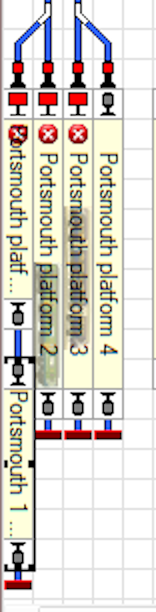
To make this work, trains arriving at Portsmouth must be set to fit within the block; they arrive at the 1st block but a successor schedule will move them to the end block if it is free.
Each schedule to Portsmouth must have several settings:
- Successor "Portsmouth plat1 successor"
- Forward driving mode ticked
- Keep train ticked
- Request in second to last block ticked
- Two schedule train length rules must be set:
- Trains must fit in destination block
- Prefer shortest destination block
We use "Schedule sequences" for trains to have a long journey around the railway. This is where a train might leave one station, do 10 "laps" round the railway in each direction then go back to the original station. To do that you have to use schedule sequences, because any one section of track is visited more than once.
I don't know if this is a new feature - but we found that the train was being changed when one schedule changed to the next. Typically that happened in fiddle yards. There is a sequence setting to prevent that: select train "keep" in each successor schedule.

Train movements on the South Downs Railway are pretty much all controlled by schedules. The schedules can be activated in several ways - by right clicking them in the dispatcher window; by using "start" and "destination" buttons on the schedule control switchboard; and by pushbuttons on DTM30 panels.
Reasonably often, though, we get an instance of Traincontroller reporting "schedule XXX cannot be started - call Details view for further information". The Details view often says little else. But there's usually a reason. I've written this list as a reminder - mostly to myself - of what to check for.
- Is there a train in the srarting block? I'm not sure I've fallen foul of that yet, but one day it will happen.
- Is the exit from the starting block locked? If you've blocked TC from being able to send a train out, then it can't go. Some of our blocks are locked by DTM30 pushbuttons (so that the station manager can control access to tracks). The DTM30 track LEDs should be green for access to be allowed.
- Is there a route out of the start block to the next block? (After some track editing in Clanfield, I found that trains could get into Clanfield but there was no route out in the schedules. I had to go through the schedules and re-add them back in).
- If the train too big for the next block? We have TC gold that can use train length as a restriction on what train can go where. If the block is too short, TC won't try to enter the block.
- Is the train in an appropriate train group for the next block? We have the terminus platforms at Clanfield and Petersfield set to accept "push/pull" trains only. That group consists of the DMUs (and will also include small steam trains that can run backwards). So when you buy a new DMU, you need to add it to the push/pull group; if you don't, then TC won't send it there.
- Similarly - is the train in an appropriate group for the route to the next block? You can restrict which trains use which routes. I don't know why we'd done it, but we had a restriction on the route into Petersfield platform 1 that was "push/pull" trains only.
So if the schedule won't start - work through the list. No doubt I'll have to extend the list at some point but this describes the common failings we get.
We have a level crossing on a busy main line. The previous way of making the crossing operate was to trigger it when any Traincontroller route through the crossing was activated. That worked for any train running clockwise. But for a train setting out from Petersfield, the train could be on the crossing before the barrier was down.
The previous approach was to have a flagman activated by any of the routes becoming reserved; the flagman activated lights, waited 4 seconds then activated barriers. But the route was immediately available to be used by a train.
We tried adding activation delays to the accessory device (the feature was designed to allow slow pointwork to have gaps between each point being activated). It gapped the point commands, but still TC wouldn't wait before running a train through.
The solution is to get rid of the flagman and have the operations in the "operations" section of each route instead. There are 9 routed through there in each direction, so a bit of editing! When each route is activated, set the lights, wait 4s, set the barriers, and wait another 4 seconds. TC only makes the route available to a train after that full process has completed.

When the route is deactivated, deselect both accessories:

The final step (not on the diagram above) has been to set a special accessory address 922 to THROWN 4s after the barriers are told to come down. That is used to allow the SIGM20 signals to go green once the crossing barriers are in place.
We did also try using macros, so that the macro could be written once. But the route doesn't wait for the macro to complete.